Appearance
Upload firmware
Who can do this: Admin User
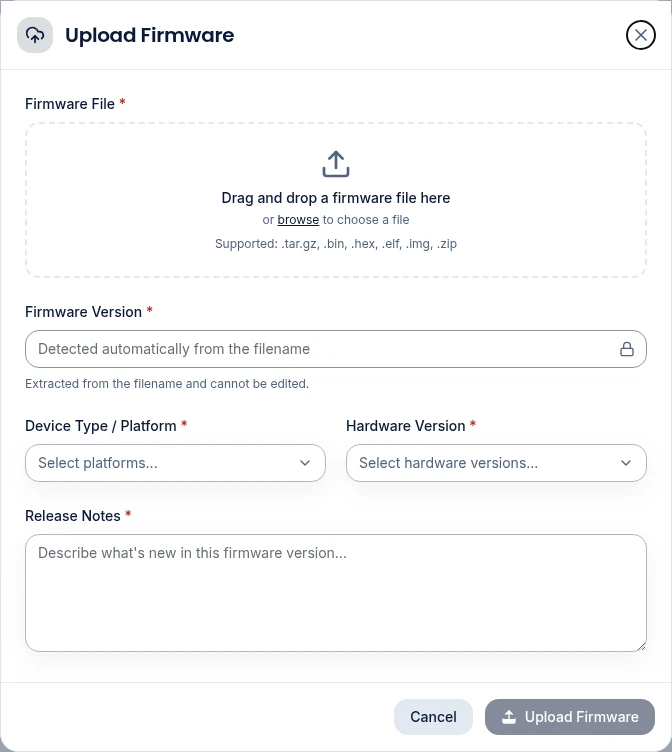
Name the file with its version
The Firmcraft IoT Dashboard reads the firmware version from the file name. You can't type it in. Name your file so it contains the version, for example:
sensor-node-v1.2.3.bingateway_2.1.0.tar.gz
Accepted file types: .bin, .hex, .elf, .img, .zip, .tar.gz. The maximum size is 100 MB.
Steps
- Open Firmware Management in the sidebar.
- Click Upload Firmware.
- Drag the file into the box, or click to choose it. The Version is filled in from the file name.
- Choose the Device Type / Platform the firmware is built for. The list shows the platforms your devices report.
- Choose the Hardware Version it supports. The list narrows to versions seen on the chosen platforms.
- Optionally describe what's new in the release notes.
- Click Upload Firmware.
The file appears on the Firmware Management tab. Click Details to see its size, the platforms and hardware versions it targets, its SHA-256 checksum and the release notes.
Common problems
"Version could not be detected from the filename." Rename the file so it contains a version such as v1.2.3, and upload it again.
"Unsupported firmware format." Use one of the accepted file types above.
The platform or hardware version I need isn't in the list. The lists come from what your devices report. Check that the device sends its platform and hardware version in its readings.