Appearance
Map view
The map shows your devices and gateways together, at the locations you gave them. Open Map View in the sidebar.
Who can see it: everyone. Each person sees only the devices and gateways they have access to.
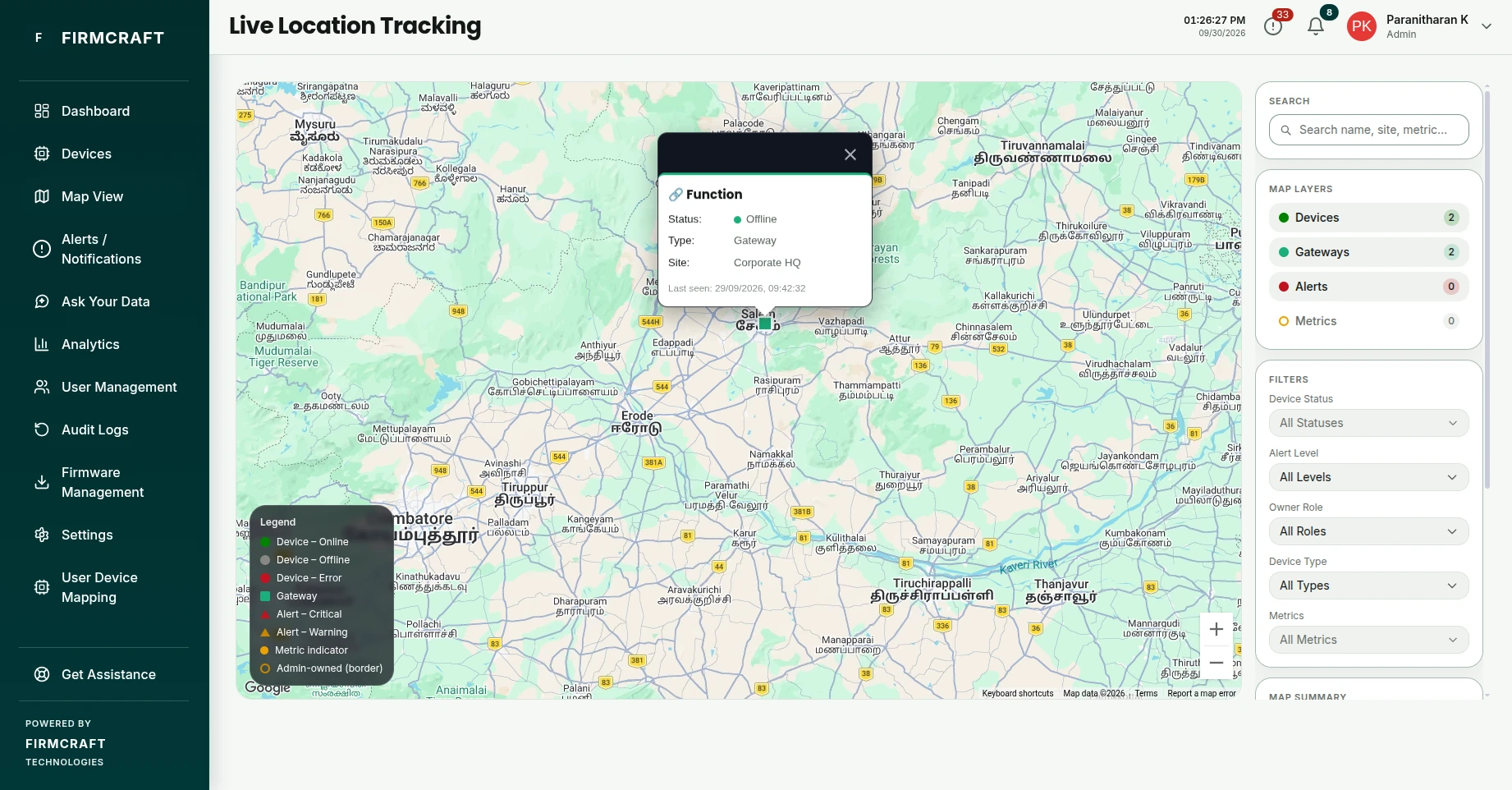
What the markers mean
| Marker | What it is |
|---|---|
| Circle | A device, colored by its status: Online, Offline or Error. A device owned by an Admin has a colored border. |
| Square | A gateway. Gateways all use one color; click the square to see whether it's online. |
| Triangle | An alert, drawn next to the device that raised it. Critical and Warning alerts have their own colors. |
| Small dot | A metric, one per reading the device sends. Only shown when the Metrics layer is on. |
The Legend in the bottom-left corner of the map shows the same colors.
Put a device or gateway on the map
A device or gateway appears on the map once it has a Latitude and Longitude:
- Device: set them in step 3 of the Add Device wizard.
- Gateway: set them in step 3 of the Add Gateway wizard.
- Either, later: open Devices in the sidebar and click Edit on its row. Devices and gateways are both listed there. The coordinates are in the first step.
Finding coordinates
In Google Maps, right-click the spot and click the numbers at the top of the menu to copy them. The first number is the latitude, the second the longitude.
Find something on the map
- Search: type a name, site or metric. Matches devices and gateways alike.
- Map Layers: turn Devices, Gateways, Alerts and Metrics on or off. Each shows how many markers it has.
- Filters:
- Device Status filters devices and gateways.
- Device Type and Metrics filter devices only. Choosing a metric hides gateways.
- Alert Level (Critical, Warning, Info) filters the alert markers.
- Owner Role (Admin, User) filters by who owns the device or gateway.
- Map Summary: how many devices, gateways, alerts and metrics are shown now, out of the total.
Click a marker
| Marker | Shows |
|---|---|
| Device | Status, type, site, owner, up to four latest readings, and when it was last seen |
| Gateway | Status, site, owner, and when it was last seen |
| Alert | Alert level, message and site |
| Metric | The metric's latest value and site |
To see a gateway's child devices and readings, open the gateway page.