Appearance
Value transforms
Gateways often send values that need a small fix before they're useful: a register that reads 2314 when it means 231.4 V, a number sent as text, or a state sent as the word RUN. Value transforms fix these in the mapping, without writing code.
Who can do this: Admin User
Add a transform
- In the mapping step, find the mapping row.
- Click Transform value under the JSON Path to open it.
- Fill in what you need. Every field is optional.
- Click Test Mapping to check the result against your sample.
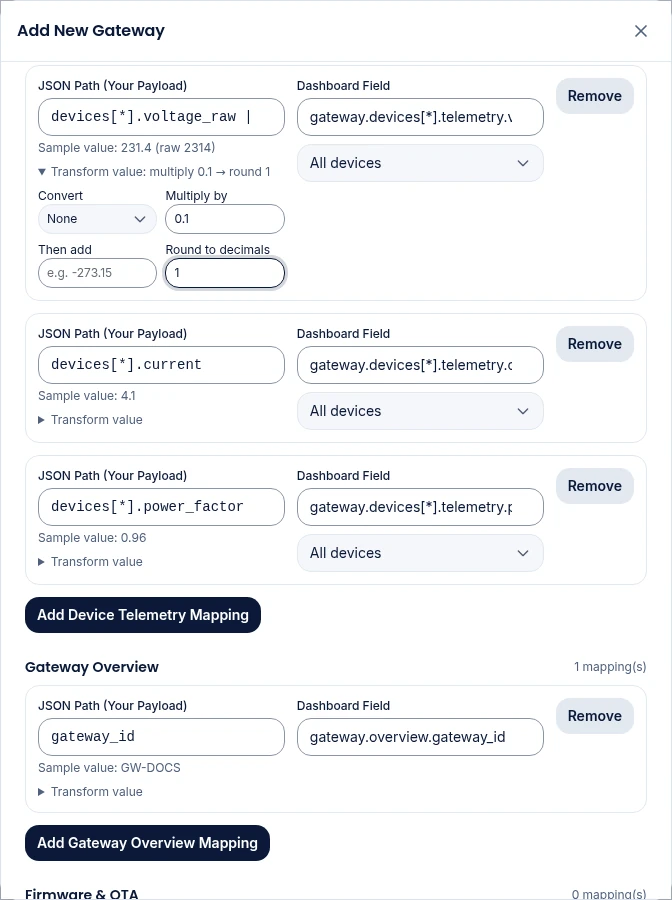
The steps always run in this order: Convert, then Multiply by, then Then add, then Round to decimals.
Convert
| Option | Does | Example |
|---|---|---|
| None | Nothing. | |
| Text → number | Turns text into a number. Understands units and commas. | "230 V" → 230, "22,5" → 22.5, "1,234.5" → 1234.5 |
| On/Off → true/false | Turns words into true or false. | ON, yes, run, open, active, high, 1 → true. OFF, no, stop, closed, inactive, low, 0 → false |
| One bit of a register | Reads one bit of a number. Enter the Bit number, where 0 is the lowest. | Status register 6, bit 1 → 1 |
| Map values | Replaces values from a list. Enter Values as FROM=TO pairs. A value not in the list is stored empty. | RUN=1, STOP=0, FAULT=2 |
| Read from bytes | Reads a number out of raw bytes (hex text or a list of bytes). Choose the Byte type and Byte offset (0 is the first byte). | For LoRaWAN sensors without a decoder |
Byte types for Read from bytes: unsigned or signed 8-bit; unsigned or signed 16-bit or 32-bit, big-endian or little-endian; and 32-bit float, big-endian or little-endian. Your device's datasheet says which one to use. "Big-endian" means the most significant byte comes first, which is the usual choice for Modbus.
Scale and round
| Field | Does | Example |
|---|---|---|
| Multiply by | Multiplies the value. Use a decimal to divide. | 0.1 turns 2314 into 231.4 |
| Then add | Adds to the value. Use a minus sign to subtract. | -273.15 turns Kelvin into °C |
| Round to decimals | Rounds to this many decimal places. | 1 turns 231.4567 into 231.5 |
Examples
| Gateway sends | You want | Set |
|---|---|---|
"voltage_raw": 2314 | 231.4 | Multiply by 0.1 |
"temp": "22.5 C" | 22.5 | Convert Text → number |
"pump": "RUNNING" | true | Convert On/Off → true/false |
"state": "FAULT" | 2 | Convert Map values, RUN=1, STOP=0, FAULT=2 |
"status": 5, bit 2 is "door open" | 1 | Convert One bit of a register, Bit number 2 |
"energy_wh": 123456 | kWh, 2 decimals | Multiply by 0.001, Round to decimals 2 |
Written as text
Transforms are stored at the end of the JSON Path, after a |. You can also type them there directly:
voltage_raw | multiply:0.1 | round:1
bytes | int16be:0 | multiply:0.01
state | map:RUN=1,STOP=0
If you type steps in another order, or use divide or subtract, the panel shows them as Custom steps and you edit them in the path instead.
Common problems
"Unknown transform: …. This value will be stored empty." A step name is misspelled. Fix it in the JSON Path.
Test Mapping says "The transform gives no value for the sample." The conversion couldn't read the value, for example Text → number on text with no number in it, or Read from bytes past the end of the frame. Check the byte offset and type.